Access Management (RBAC)
Designing a role-based access system that lets external university partners safely manage who on their team can do what, without a support ticket.
Where this started
The IDP Partner Portal is a high-stakes B2B dashboard connecting IDP's internal campaign and account managers with external university partners. University partners leverage this platform to publish advertising campaigns, monitor student conversion metrics, allocate scholarships, and analyze portal activity.
As portal features expanded, university clients faced a significant administrative hurdle: they had no self-serve mechanism to manage who on their team could perform specific tasks. Every minor authorization change required raising a manual support ticket with IDP support staff. Additionally, legacy portal permissions were heavily advert-centric, with no clean abstractions representing real Admissions, Marketing, or Scholarship operations teams.
Four failures of legacy access
01No partner-side access management
Universities had no autonomy to add teammates or scope their access. Without self-service tooling, basic tasks like onboarding a new marketer or removing a departed administrator required IDP manual intervention, increasing operational friction and support load.
02Advert-centric, incomplete permission model
The original permissions only covered advert creation and approval. As the portal grew to include scholarships and detailed conversion reports, there was no logical place to map access for admissions officers or marketing directors.
03Over-provisioning risk
Because permissions were broad and loosely defined, administrators routinely granted full administrative access to avoid workflow interruptions. This created a significant security risk for sensitive student recruitment and performance data.
04Asymmetry between internal and external needs
Internal IDP admins require dense data layouts, comprehensive audit logs, and complex configurations. External university admins, however, need guided workflows and simple plain-language labels. Attempting to solve both with a single user experience resulted in usability issues on both sides.
The core model
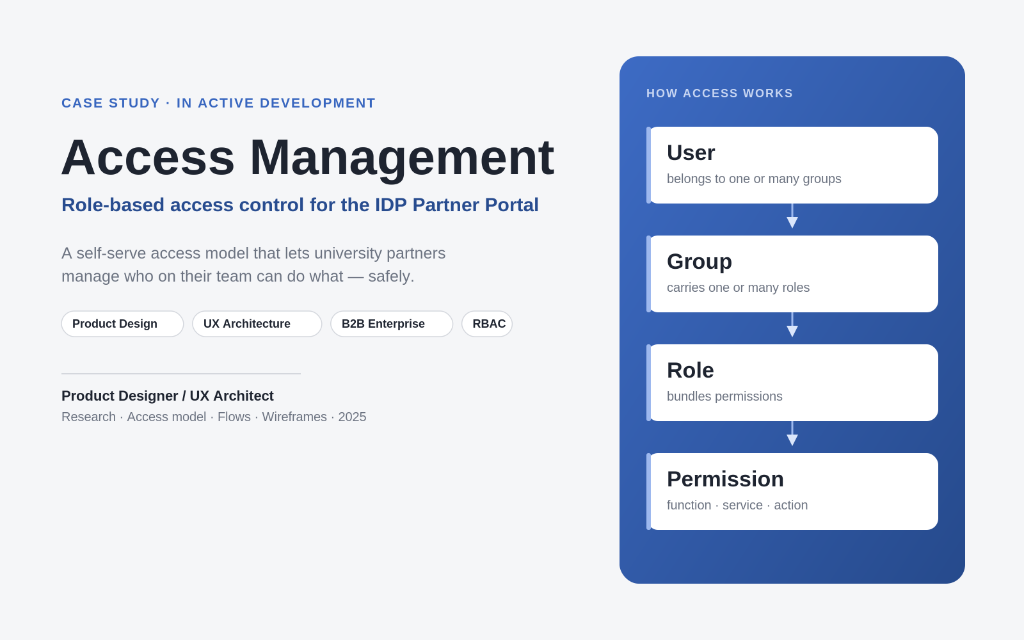
I anchored the system on a single, clean architectural chain:
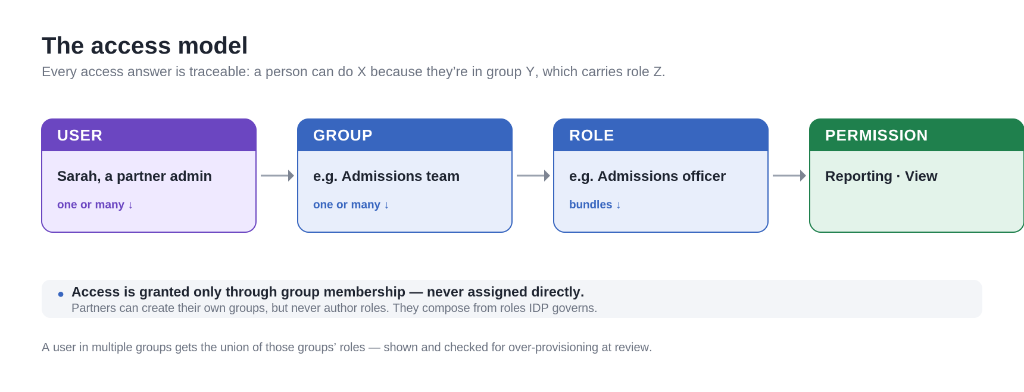
To keep access predictable and auditable, a User never receives direct permission grants. They can only inherit access by being placed inside a Group.
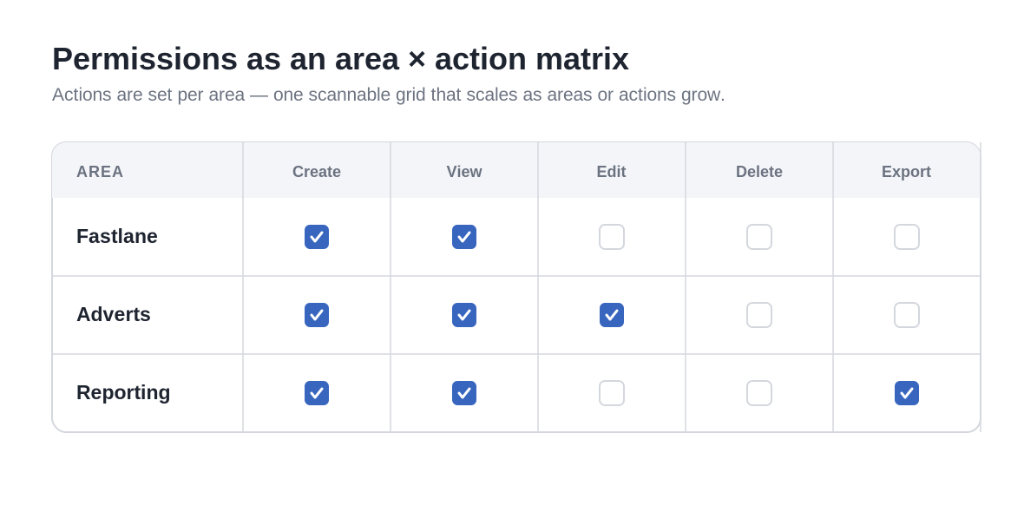
A Group maps to one or more governed Roles. Each Role packages a functional matrix of Permissions (defining actions like Create, View, Edit, Delete, or Export across portal services).
Why this matters: university administrators can customize and manage Groups on their own, but they cannot author new Roles. Roles are governed centrally by IDP. This structural boundaries prevent privilege creep while granting partners the autonomy they need to orchestrate their teams. When users belong to multiple groups, their combined access is evaluated as the union of those groups' roles.
Key design decisions
1. Access only via group membership
By enforcing user-to-group membership as the sole access path, we keep the audit story clean and traceable. Direct user-level overrides are disabled.
2. Compose, don't author
University admins compose their custom groups from a list of predefined roles. The ability to create or edit the underlying roles is restricted to the partner interface, preventing arbitrary permission configurations.
3. Legible roles & permissions before selection
All group and role selection surfaces display the active roles directly in the table, with on-demand info tooltips exposing the precise permissions. Administrators understand exactly what privileges are being extended without needing to navigate away.
4. Combined access preview and over-provisioning warnings
When adding users to multiple groups, the interface displays a combined union of their access. If a selected combination yields high-privilege administrative access, the system highlights it with a warning.
5. Friction by design for destructive actions
High-impact changes like deleting custom groups or assigning administrative privileges trigger confirmation screens. These display the impact (such as lists of orphaned users) and require explicit confirmations.
6. Contextual UI asymmetry
Internal IDP administrators use a dense audit log interface designed for speed, while external university administrators use progressive, plain-language setup screens.
Flows & screens
Add a user — method first
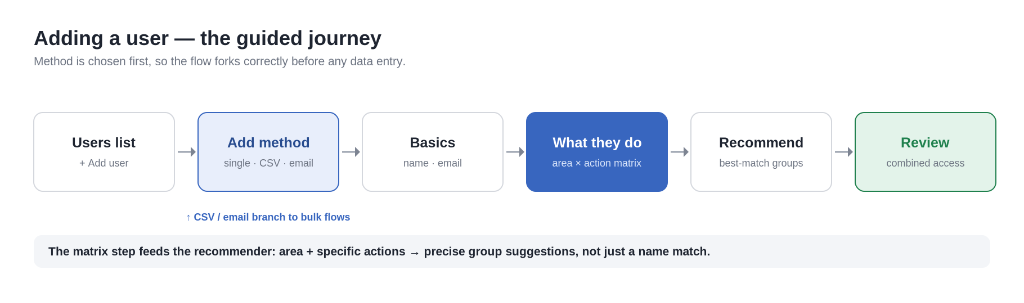
Clicking "Add user" opens a modal prompting the administrator to choose an onboarding method: single user setup, bulk upload via CSV, or bulk invite via email. This fork streamlines the data-entry steps early in the process.
Guided "What they do"
Instead of forcing administrators to navigate technical role descriptions, they select the operational areas a user works in and specify permissions using a compact area × action checkbox grid.
Recommended groups
Based on selected permission profiles, the system suggests pre-configured groups, labeling the "best match" alongside detail summaries of what access the recommended groups provide.
Direct group selection
Power users can select groups directly from a data table displaying role details and tooltips, while selected choices display as dismissible visual chips.
Create your own group
A step-by-step setup wizard (Name → Add Roles → Assign People → Review) allows administrators to compose custom teams. The final review screen previews combined privileges and flags potential over-provisioning issues.
Groups list, edit, and delete
The management surface keeps system-governed roles locked under safe defaults while allowing custom groups to be edited or deleted. The deletion flow lists which users will lose access and requires reassignment details.
Escape hatch for outsiders
For external contractors and freelancers, a scoped path bypasses group placement. This path restricts access to read-only reporting and flags these accounts for audit tracking.
Designing for edge cases
In B2B portal interfaces, complex setups fail at the boundaries. I mapped and addressed several critical edge cases during flow modeling:
- Abandoned setups: When custom group flows are left incomplete, drafted roles are cached locally to prevent data loss.
- Orphaned members: Group deletion flows check if team members would be left without any access. Admins must reassign these users to a new group before finalizing deletion.
- Privilege escalation warnings: If an admin combines roles that stack into high-privilege permissions, the review step highlights the security override.
- System vs. Custom boundaries: Core system roles are locked under read-only templates to prevent accidental degradation of portal security defaults.
Status & next
The access management architecture is in active development. The underlying system models and interaction flows are finalized, and engineering has begun implementing the core role and token checks.
Next steps include designing detailed audit trails for internal admins, finalizing the CSV parse schemas for bulk invitations, and conducting validation sessions with university managers to test the guided configuration workflows.
Reflection
Designing access control systems is always a balance between security and autonomy. In this system, drawing a clean architectural boundary (letting partners compose groups, but governing roles centrally) resolved the friction. University administrators gained speed and flexibility, while IDP maintained central authority over the actual capabilities available on the platform.